
How to Load KCT Token: KCT1, KCT2 Order When Meter Says Reject
Your meter says REJECT or EEE after a tariff or meter change. Get the two KCT codes from your DisCo, load them in the right order, and fix the other common causes.
You typed all 20 digits of a new token, and the meter flashed REJECT or EEE. Usually that means your DisCo changed the meter's tariff or key settings, and the meter now wants two key change tokens, called KCTs, before it accepts any new credit.
Get both codes from your DisCo. Load them in order, then type your token again. Below is how to load KCT token codes in the right order, and what else to check if the meter still refuses.
What a key change token (KCT) does to your prepaid meter
A KCT updates the settings stored inside your meter: its tariff, key revision or supply group. It isn't credit. You get it as two 20-digit codes, and you type them one after the other on the meter's keypad, the same way you'd type a normal token.
Two things usually trigger it: a tariff change or a meter upgrade. If your band or tariff changed recently and tokens started failing around the same time, ask your DisCo whether it issued a KCT for your meter. Don't assume every band change needs one, though, because DisCos often handle band moves on their vending side.
How to tell this is your problem
Hold the receipt next to the meter. Check that the meter number matches, that you bought under the right DisCo, and that the token is fresh with all 20 digits there. If all of that checks out and the screen still says REJECT, a missing KCT is the likely reason. EEE usually points to a token for a different tariff from the one your meter holds.
Brands label their errors differently, so treat these codes as strong hints, not fixed rules.
Where to get KCT1 and KCT2 from Ikeja Electric, IBEDC and other DisCos
DisCo routes as at 17 November 2026:
- Ikeja Electric (IKEDC): open KCT Retrieval, under Token Management on ikejaelectric.com, and enter your meter number. Customer care can also give you the codes.
- Ibadan Electricity (IBEDC): go to ibedc.com/kct-generator to generate your key change token online: enter your meter number and tap Get Token.
- Eko Electricity (EKEDC), Abuja Electricity (AEDC) and other DisCos: ask customer care, or the shop or agent where you buy tokens. Give your meter number and your current tariff.
How to load KCT token in the right order
Order matters more than speed. Write both codes and your new token on paper before you start, so you aren't scrolling through old SMS messages while the keypad quietly times out on you.
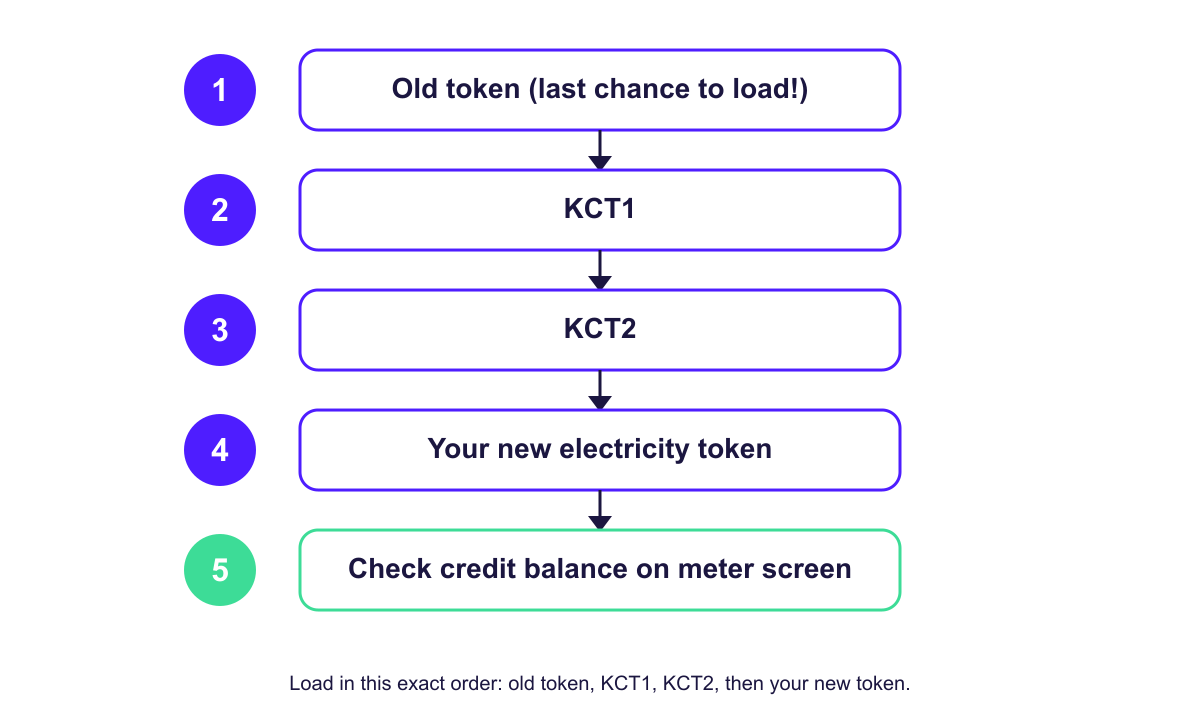
- Type any old unused token you still have and press Enter. After the KCTs go in, the meter refuses old tokens.
- Type KCT1 and press Enter.
- Wait for the meter to accept it.
- Type KCT2 and press Enter.
- Type the token you bought and press Enter.
- Check the credit balance on the meter.
Ask everyone else in the house who buys tokens. A token someone forgot in a drawer may never load once the update goes through.
The KCTs went in, but the meter still rejects
Start with the meter number on the codes. Your DisCo makes each KCT for one meter, so a pair meant for your old meter, or for your neighbour's, won't load on yours. Compare the number on the SMS or receipt with the one on the meter before you try anything else.
Next, think back over the order you used. KCT1 goes first, KCT2 second, and your new token comes last. If you typed the first code twice or skipped the second, you've broken the sequence. Start again from KCT1.
The meter may now refuse an old token that sat unused through the update. Ask your DisCo whether it can reissue it.
Wrong meter number, wrong DisCo or a missing digit (E6)
Read the meter number on your receipt digit by digit against the one on the meter. Check the DisCo too. A Lagos home sits under either Eko or Ikeja Electric, and a token you buy under the wrong one will never load on this meter, no matter how many times you try it.
When both match, look at your typing. On many meters, E6 means you entered fewer than 20 digits, so clear the screen and type the token again slowly, in groups of four. Each token works only once, which means one that loaded earlier will fail the second time.
If you bought on AidaPay, copy the token from the receipt under Transactions instead of retyping it from memory.
Link error or Time out: the split-meter keypad has lost contact
Split meters have a keypad indoors and the meter itself outside, often up on a pole.
When the screen shows Link error or Time out instead of REJECT, the keypad isn't reaching the meter. Put fresh batteries in it, or plug it into a socket closer to the meter. Then start again from KCT1.
Still rejected? Call your DisCo with these details ready
Only your DisCo can issue or reissue a KCT, so this is the call that fixes it. Before you dial, gather your meter number, the token and KCT codes you tried, and the date, time and amount of your purchase. That way the agent can trace it quickly.
Ikeja Electric customers can call 0201-7000-250. If that line stays busy, try 0201-227-2940, or send the same details to customercare@ikejaelectric.com. IBEDC customers can ring 07001239999 or email customercare@ibedc.com.
With EKEDC, AEDC or any other DisCo, call its customer care line and ask which KCT it issued for your meter. Ask the agent to send it again. If your DisCo doesn't sort it out, take the complaint to the NERC Forum Office for your area; you'll find the offices on nerc.gov.ng.
To avoid a repeat, load every old token as soon as your DisCo announces a meter or tariff update, and keep the KCT SMS or receipt. For anything else your screen shows, here are other prepaid meter error messages and what they mean. Once the meter takes credit again, you can buy your next electricity token and keep the receipt with the token on it.
Frequently asked questions
What is a key change token on a prepaid meter?
Does loading KCT remove my remaining units?
How do I get KCT for IKEDC meter?
Why is my meter rejecting token after KCT?
Can I use my old token after loading KCT?
Can I get my key change token online?
How do I enter a key change token on my prepaid meter?
More like this.
 Electricity
 Band A: ₦209.50/kWh Doesn't Mean 20 Hours of Light
Moved to Band A in Lagos? The 20 hours is a weekly average, a downgrade isn't instant, and ₦20,000 buys about 95 units against Ban...
 Electricity
Free Prepaid Meter: How to Get One Under NERC's ₦30bn Order
Unmetered on Band A or B? NERC's ₦30bn Tranche C pays for your meter. Here's when installs can start, what to do at each DisCo, an...
 Electricity
AEDC Token Not Loading? 6 Causes and the Fix for Each
Meter says Reject or Used? Work through six causes, from a mistyped digit to the KCT update, with the exact steps and AEDC contact...