
How to Check WAEC Result Without a Scratch Card: NIN or e-PIN
Since 5 August 2026, school candidates can get their WAEC serial number and PIN with a NIN and OTP. Here's how to fill the five waecdirect.org boxes, use SMS and fix common errors.
To check your WAEC result online, go to waecdirect.org and enter your 10-digit exam number, the exam year, the exam type, and your e-PIN's serial number and PIN. You don't need a scratch card. Since 5 August 2026, school candidates can get that serial number and PIN on waec.org with their NIN and an OTP.
Knowing how to check WAEC result starts with your photo card or registration slip, because you'll type the exam number on it at almost every step, on both websites and in the SMS.
School candidates: get your serial number and PIN with your NIN
The result checker is now a digital e-PIN. Before 5 August, you bought a physical scratch card; since then, school candidates who registered with a NIN can pull up their serial number and PIN online instead. Old cards still work. Each one serves a single candidate's exam number, so two siblings can't share a card, however much your mum would like them to.
Here's the NIN route, step by step:
- On waec.org, tap "serial number and PIN" in the top menu.
- Pick the exam year and diet.
- Type your exam number and your registration NIN.
- Enter your email address and phone number.
- Enter the OTP (one-time password) WAEC sends you.
Your serial number and PIN then show on screen. The page finds you by matching the NIN against your registration record, so a candidate who registered without a NIN may not be able to use this route. If it can't find you, buy an e-PIN.
How to check WAEC result on waecdirect.org: the five boxes, in order
Now open waecdirect.org. The result form has five boxes:
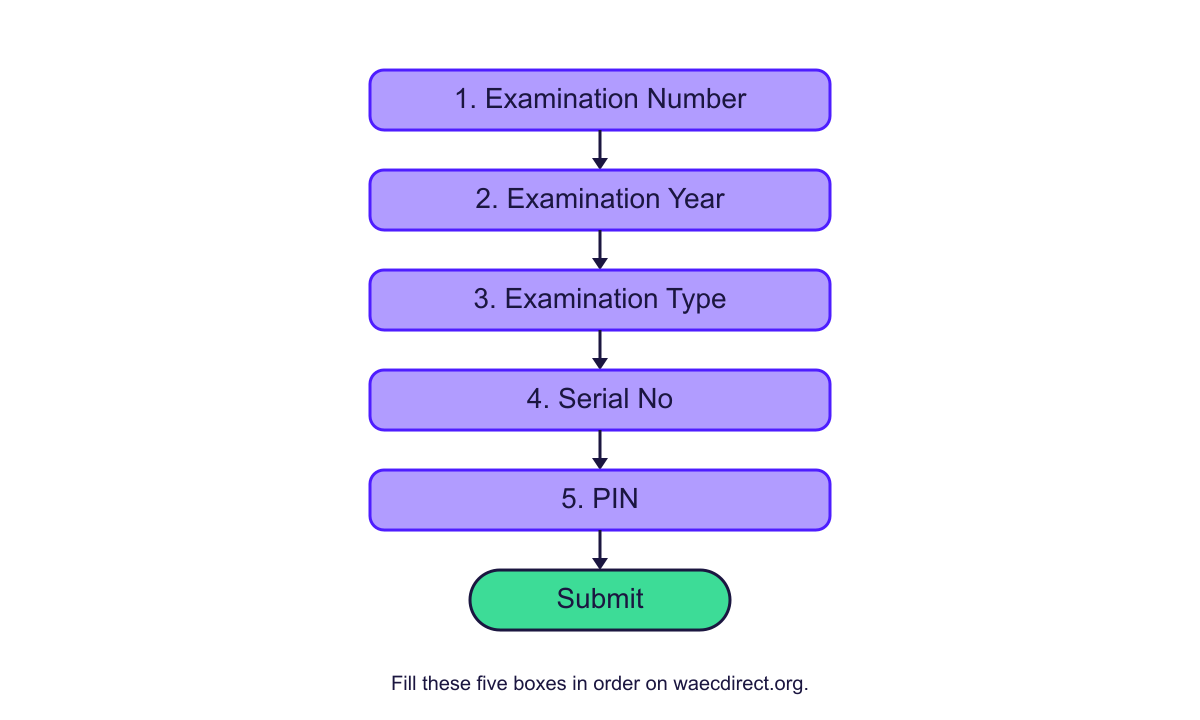
| Box | What you enter | Watch out for |
|---|---|---|
| Examination Number | 10 digits: your 7-digit centre number, then your 3-digit candidate number (for example 4123456789) | Results from before 1999 use 8 digits: a 5-digit centre number plus the 3-digit candidate number |
| Examination Year | Pick from the list, which runs from 2026 back to 1980 (as at 19 October 2026) | Choose the year you sat the exam, not this year |
| Examination Type | School Candidate Results or Private Candidate Results | GCE candidates sit as private candidates |
| Serial No | The e-PIN voucher number | Copy it straight from your receipt or the waec.org page |
| PIN | The PIN from the same e-PIN | It must belong to the same voucher as the serial number |
Tap Submit. A short "please wait" message shows while the portal fetches and decrypts your record. Each card allows a limited number of checks, though WAEC doesn't say how many, and once those run out you'll need a fresh card to keep checking.
No internet? A plain SMS works. Type WAEC*ExamNo*PIN*ExamYear with no spaces, putting your real exam number, PIN and year in place of the words, then send it to 32327 from an MTN, Glo or Airtel line. Your grades come back as a text. Standard SMS charges apply.
Who still has to buy an e-PIN, and what it costs
The NIN route is narrow. It covers only 2026 school candidates who registered with a NIN. Everyone else buys an e-PIN: private and GCE candidates, anyone checking a result from an earlier year, and anyone who registered without a NIN. You'll also need a new card once the old one runs out of checks, or once someone has tied it to another exam number.
Prices below are as at August 2026 for WAEC and 19 October 2026 for AidaPay (see today's exam PIN prices):
| Where you buy | Price |
|---|---|
| WAEC result checker e-PIN, direct from WAEC | ₦5,000 |
| AidaPay: WASSCE/GCE result checker PIN | ₦5,350 (₦5.35 cashback) |
To buy a WAEC result checker PIN for yourself or your child on AidaPay, go to Home > Education > WAEC Result Checker PIN, choose the quantity and confirm with your PIN. The serial number and PIN land on your receipt and stay saved under Transactions, so losing the screenshot won't cost you a second card.
What the common waecdirect.org errors mean
Hold off on a second card. Find your problem below first.
| What happens | Likely cause | What to do |
|---|---|---|
| No record comes up | Wrong exam type or wrong year | Switch between school and private, and recheck the year you sat |
| Exam number rejected | Fewer than 10 digits, often a dropped zero in the centre number | Copy all 10 digits from your photo card; use 8 only for pre-1999 results |
| PIN refused | Someone already used the card with another candidate's number | Buy a new e-PIN for this candidate |
| Card worked before, now fails | You've used up its checks | Buy a new card |
| Result withheld or not showing | Not a PIN problem at all | Contact WAEC directly |
For portal trouble, call the support desk on 01-9049320. Toll-free, dial 0700 828 3272 (it spells 0700VATEBRA). Email works too: customersupport@vatebra.com. Whichever you pick, have your exam number ready, plus a screenshot of the exact screen where things went wrong.
What you need before you check your WAEC result
Get your photo card or slip out first. Copy all 10 digits. If you sat as a school candidate this year, try the NIN route on waec.org before you pay for anything. Then confirm whether you sat as a school or private candidate, and in which year, because those two choices cause most of the "no record" results people hit on the portal. Bought a card? Keep the receipt, and use it only for your own exam number. Then open waecdirect.org, fill the five boxes slowly and press Submit. Two children means two cards.
Frequently asked questions
Can I check my WAEC result without a scratch card?
How many digits is a WAEC examination number?
How much is the WAEC result checker PIN?
Can I check my WAEC result using my phone?
Why is waecdirect not showing my result?
Which website do I use to check my WAEC result?
Where do I check a WAEC GCE result?
What is the code to check WAEC result by SMS?
More like this.
 Exams & results
2027 Exam Timetable: UTME, NECO and WAEC Dates and Result Waits
Under the proposed 2027 calendar, UTME moves to 15–25 March and WAEC and NECO results are due by August. One SS3 family's dates, w...
Exams & results
2027 Exam Timetable: UTME, NECO and WAEC Dates and Result Waits
Under the proposed 2027 calendar, UTME moves to 15–25 March and WAEC and NECO results are due by August. One SS3 family's dates, w...
 Exams & results
How to Check JAMB Admission Status on CAPS Before You Pay
Log in to e-Facility, open CAPS and read your real admission status in about five minutes. See where the portal trips people up an...
Exams & results
How to Check JAMB Admission Status on CAPS Before You Pay
Log in to e-Facility, open CAPS and read your real admission status in about five minutes. See where the portal trips people up an...
 Exams & results
How to Accept Admission on JAMB CAPS: Free, Then ₦2,200 to Print
Accepting your JAMB CAPS offer costs nothing. The admission letter and result slip come to ₦2,200, and missing the four-week windo...
Exams & results
How to Accept Admission on JAMB CAPS: Free, Then ₦2,200 to Print
Accepting your JAMB CAPS offer costs nothing. The admission letter and result slip come to ₦2,200, and missing the four-week windo...